What is our process?
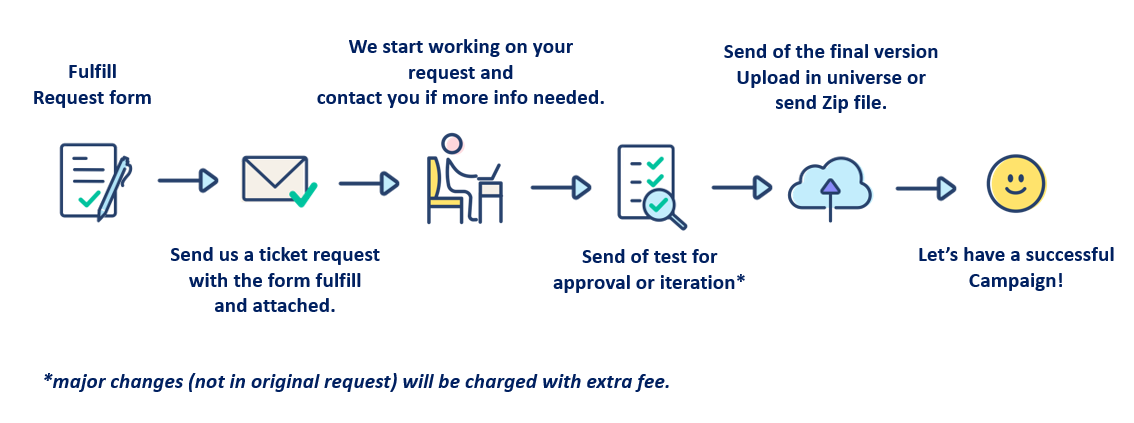
What information do we need to start working? (put detail in the form attached)
| Compulsary | Optional | |
| Info needed for Campaign | Zip file with the coded design (if design coded Outside Splio) | Campaign category (specify a category for your campaign if you wish to do a precise re-targeting) |
| The subject of the email | Operation code (the code of your marketing operation. Use the same code for all campaigns within your operation) | |
| Date & hour of sending | Submission speed (only for campaigns bigger than 200 k recipients) | |
| Name of the universe | Barcode | |
| Target (ID or name of the filter, name of the already created list or file to upload) | Variables |
Warning: Campaign management has some limitations:
 |
All campaigns | SMS campaign | Email campaigns |
| Limitation | Manually uploaded recipients' lists need to have less than 400 000 lines, otherwise, it has to be divided into parts | Text with less than 160 characters | Single campaign: when the campaign is set, there is no possibility to upload the new design. We have to cancel the campaign and set up a new one |
| Text with less than 70 characters if you use special characters (à, ę, ü) | |||
| Automated SMS campaigns: the variable for the landing page doesn't work | |||
| GDPR: there should be a possibility to unsubscribe in every campaign | |||
| Avoiding the use of emoticons is recommended as they may not be supported by some operators |
If you want to know more about creating campaigns, you can learn here, at our Help Center.
Interested?
1) Download and fulfill the brief.
2) Create a request and attach the brief, we will come back to you soon with the quotation.