What is our process?
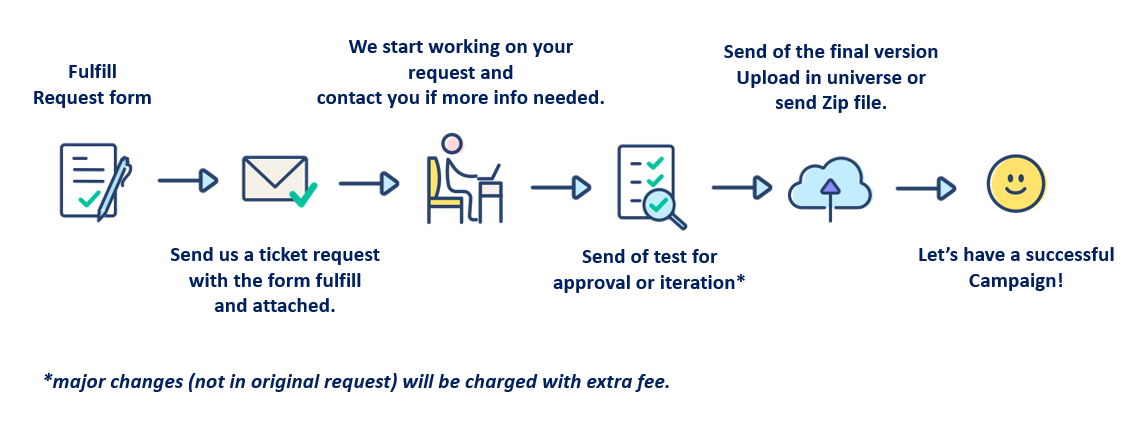
What information do we need to start working? (put detail in the form attached)
| All Campaigns | Geo-fenced Campaign | Triggered Campaign | Optional | |
| Info needed | Name of the pass, description (message), additional information (it could be the link) | Latitude and longitude of the localization | Type of the trigger (e.g birthday date, welcome info, reward info) | If you want us to create a store manually, we will need: the name, address, ID of the store and its website |
| Language | ||||
| Colours for labels, background and texts, in hexadecimal (example: #000000) | ||||
| Logo in PNG format without background (recommended size 480x150 px) | Geofence notification, target (all users or limited targets) | |||
| Icon in PNG (recommended size 512x512 px) | ||||
| Strip image in PNG (recommended size 960x369 px) | If the campaign should have a limited time period: start date and end date of the geo-fenced campaign | |||
| Info about the target (dynamic rules or static list) |
Warning: Mobile wallet has some limitations:
 |
All campaigns |
| Limitations | Create a Mobile Wallet campaign for other platforms than Android and iOS |
| Set up the range of geo-fenced notifications for iOS users, it will be displayed within a 100m radius | |
| For iOS users, only 10 shops will be displayed as the most relevant shops based on a radius, but the client can set up as many stores as needed | |
| The behaviour for Android can vary and will depend on each device and updates | |
| Users can disable geo-fenced notifications | |
| The URL field is required only for Android users and will usually send back to the homepage of the brand | |
| Regarding push notifications, you can only set start date (no control of the end date) |
Interested?
1) Download and fulfill the brief.
2) Create a request and attach the brief, we will come back to you soon with the quotation.